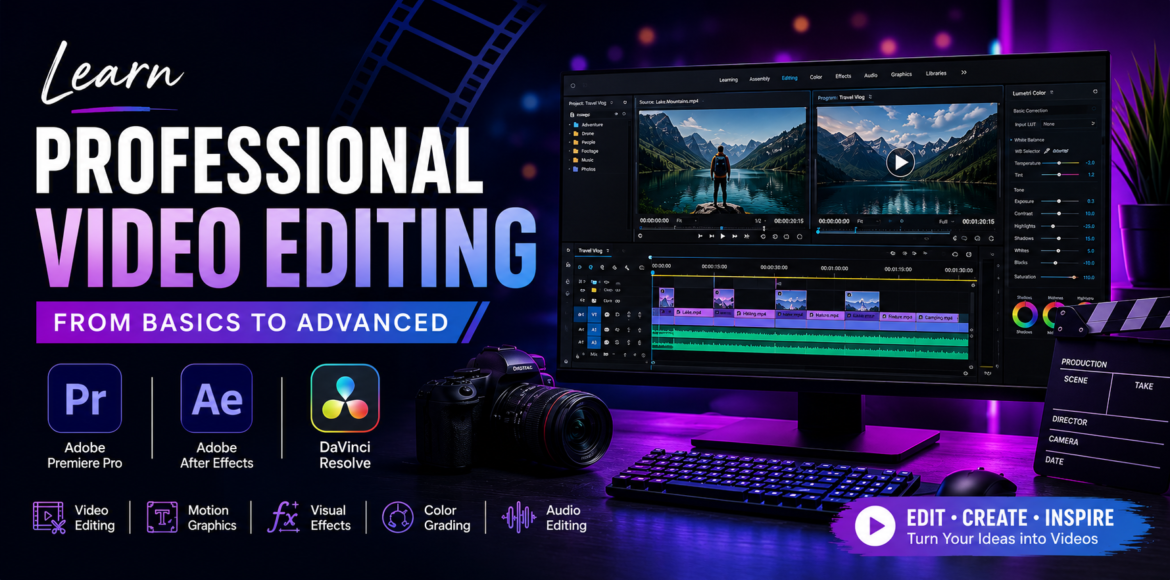
Learn Professional Video Editing from Basics to Advanced
Video has become one of the most powerful forms of communication in today’s digital world. From YouTube videos and Instagram Reels to advertisements, corporate films, wedding films, documentaries and movies, video content is now an important part of how people consume information and entertainment.
As the demand for video content continues to grow, video editing has become an increasingly valuable creative and professional skill. However, becoming a good video editor involves much more than learning how to cut and join clips. A professional editor needs to understand storytelling, pacing, sound, colour, visual effects, motion graphics and the technical process of producing a finished video.
For students, beginners, content creators and aspiring creative professionals in Vadodara, joining a structured Video Editing Course in Vadodara can provide a practical path to developing these skills.
This guide explains what video editing involves, what you should learn, which professional software is worth learning, how video editing interfaces work, and what career opportunities are available.
Why Learn Video Editing?
Video is used across a wide range of industries today.
Businesses use video for advertising and marketing. Content creators use it for YouTube and social media. Companies use videos for training and communication, while filmmakers use editing to construct stories and create emotion.
Video editing skills can therefore be useful in:
- Digital marketing
- Social media
- Advertising
- Film and television
- YouTube content creation
- Corporate communication
- Education
- Events and weddings
- Personal branding
- Freelancing
- Content production
Learning video editing can also be useful for entrepreneurs and business owners who want to create their own promotional content.
What Do You Learn in a Video Editing Course?
A professional video editing course should not focus only on software commands.
Students should understand the principles of editing first and then learn how to apply those principles using professional software.
A comprehensive course can include the following areas.
1. Video Editing Fundamentals
Before working on advanced projects, students should understand:
- Frames and frame rates
- Resolution
- Aspect ratios
- Video formats
- Codecs
- Timeline concepts
- File management
- Basic editing terminology
These fundamentals make it easier to work with different cameras, platforms and video formats.
2. Cutting and Trimming
Cutting and trimming are some of the most basic skills in video editing, but they are also among the most important.
Editors need to identify the strongest portions of footage, remove unnecessary material and arrange clips so that the video flows naturally.
The timing of a single cut can change the entire feel of a scene.
3. Storytelling and Pacing
Editing plays a major role in storytelling.
The order of shots, duration of clips, music, sound effects, transitions and even moments of silence can influence how the audience feels.
A fast-paced edit might work well for an action sequence or social media Reel, while a documentary or emotional story may require a slower rhythm.
4. Audio Editing
Good visuals cannot compensate for poor audio.
Video editors may need to work with:
- Dialogue
- Voice-over
- Background music
- Sound effects
- Ambient sound
- Audio transitions
- Noise reduction
- Audio levels
Understanding basic sound editing is therefore an important part of professional post-production.
5. Colour Correction and Colour Grading
Colour correction and colour grading are two related but different processes.
Colour correction is primarily about making footage look balanced and consistent by adjusting exposure, white balance, contrast and other properties.
Colour grading is more creative. It can be used to establish a particular mood, atmosphere or visual style.
For example, a scene can be given a warm, nostalgic appearance or a cooler, dramatic look depending on the story.
6. Motion Graphics and Visual Effects
Modern video content frequently combines video footage with graphics and animation.
Editors may need to create:
- Titles
- Lower thirds
- Subtitles
- Captions
- Logo animations
- Animated text
- Promotional graphics
- Visual effects
This is where learning motion graphics and compositing software becomes useful.
3 Best Software to Learn for Professional Video Editing
There are many video editing applications available, from simple mobile editors to advanced professional post-production systems.
For students who want to develop professional skills, three particularly valuable applications are:
Adobe Premiere Pro
For professional video editing
Adobe After Effects
For motion graphics, animation and visual effects
DaVinci Resolve
For video editing, colour correction, colour grading and post-production
Each application has different strengths, and learning how they work together can provide a broader understanding of professional post-production.
1. Adobe Premiere Pro – Professional Video Editing
Adobe Premiere Pro is a professional video editing application used to assemble and refine video and audio footage.
It is suitable for a wide variety of projects, including:
- YouTube videos
- Corporate videos
- Advertisements
- Social media videos
- Wedding films
- Interviews
- Documentaries
- Short films
- Promotional videos
- Multi-camera projects
Premiere Pro is particularly useful for learning the core workflow of professional non-linear video editing.
Important Premiere Pro Skills
A structured course can teach students:
- Project creation and media management
- Timeline editing
- Cutting and trimming
- Transitions
- Speed changes
- Audio editing
- Titles and captions
- Colour correction
- Multi-camera editing
- Green-screen workflows
- Export settings
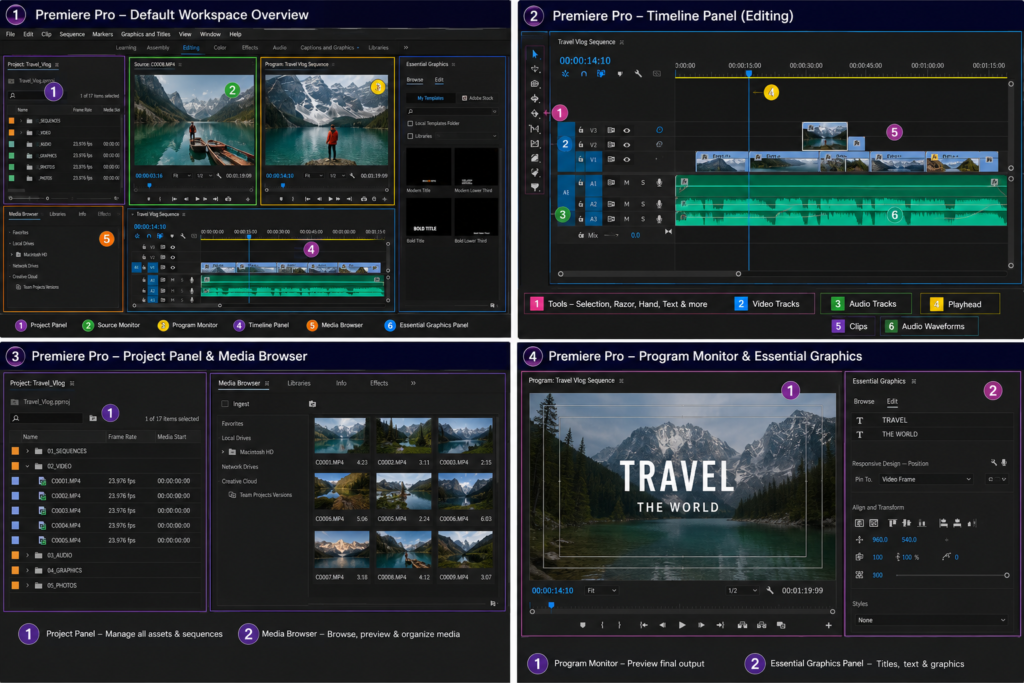
Adobe Premiere Pro Interface
2. Adobe After Effects – Motion Graphics and Visual Effects
Adobe After Effects serves a different purpose from Premiere Pro.
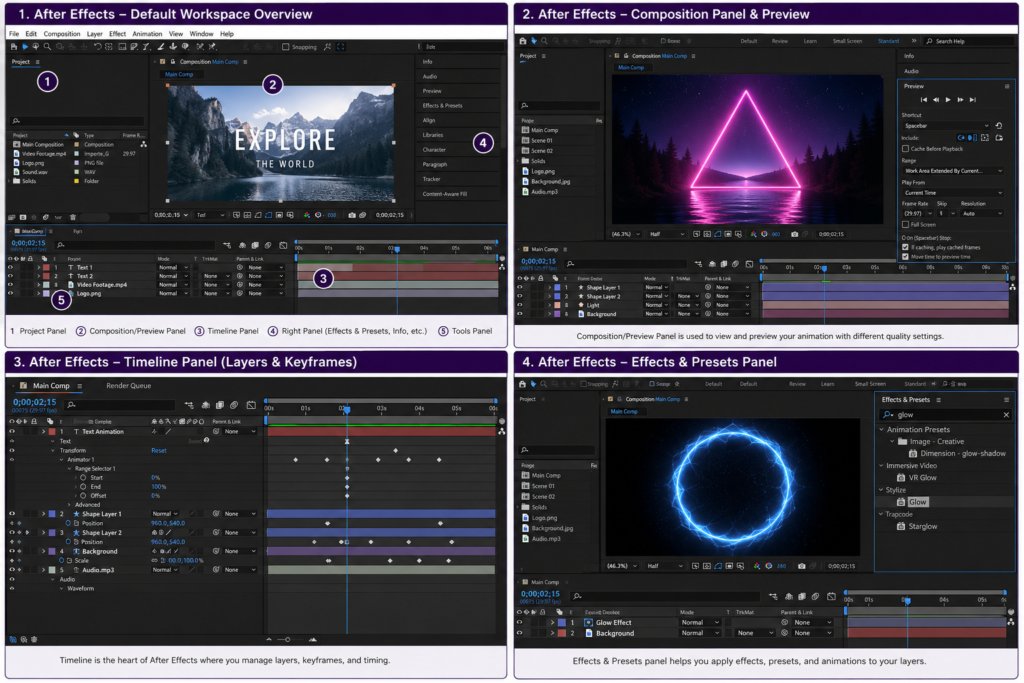
While Premiere Pro is primarily focused on assembling and editing video, After Effects is designed for motion graphics, animation, compositing and visual effects.
It can be used for:
- Animated titles
- Logo animation
- Motion graphics
- Text animation
- Visual effects
- Green-screen compositing
- Motion tracking
- Rotoscoping
- Explainer videos
- Advertisement graphics
- Screen replacement
For example, an editor may assemble an advertisement in Premiere Pro and then use After Effects to create animated titles, tracking effects or visual effects for selected shots.
Why Learn After Effects?
Video content increasingly combines traditional editing with animation and graphics.
Learning After Effects can therefore help editors expand their skill set into:
- Motion graphics
- Advertising
- Social media content
- Explainer videos
- Visual effects
- Animation
Adobe After Effects Interface
3. DaVinci Resolve – Editing, Colour Grading and Post-Production
DaVinci Resolve is a professional post-production application that combines multiple stages of video production within one platform.
It can be used for:
- Video editing
- Colour correction
- Colour grading
- Visual effects
- Audio post-production
- Cinematic finishing
One of its most recognized strengths is its professional colour workflow.
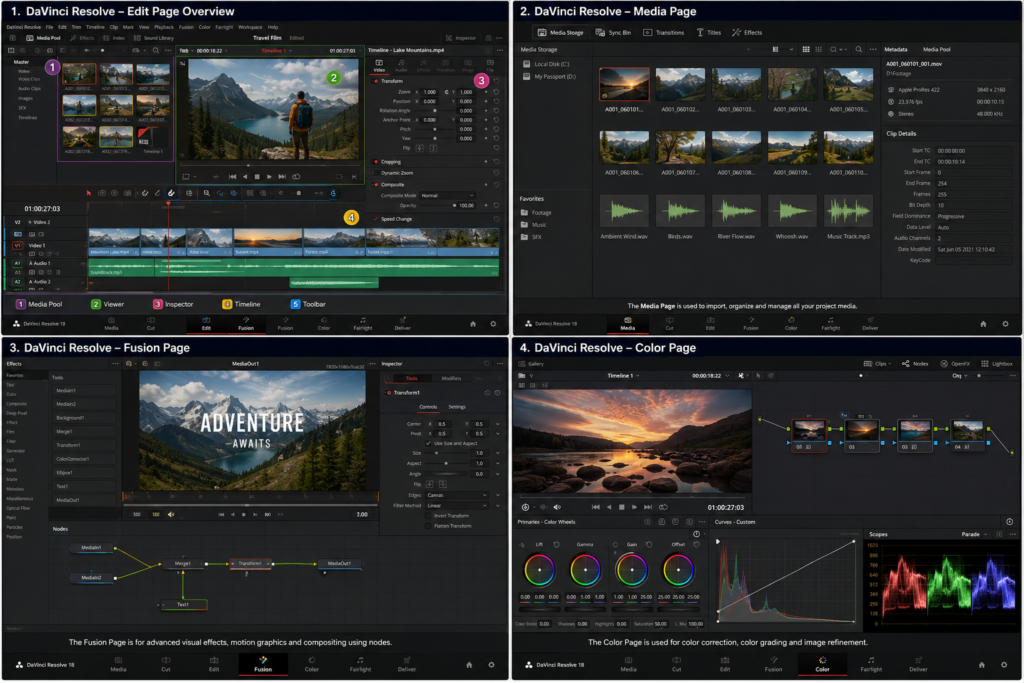
DaVinci Resolve Color Page – Understanding Colour Grading
Colour can dramatically change the appearance and emotional impact of a video.
DaVinci Resolve’s Color page provides tools for analysing and adjusting footage.
Editors and colourists can work with:
- Exposure
- Contrast
- White balance
- Saturation
- Colour balance
- Skin tones
- Creative colour looks
- Primary and secondary corrections
DaVinci Resolve Color Interface
Premiere Pro vs After Effects vs DaVinci Resolve
These three applications are not necessarily alternatives where you have to select only one.
They are often used for different stages of the post-production process.
| Software | Primary Use | Major Strength |
|---|---|---|
| Adobe Premiere Pro | Video Editing | Timeline-based editing |
| Adobe After Effects | Motion Graphics & VFX | Animation and compositing |
| DaVinci Resolve | Editing & Colour | Colour correction and grading |
How to Read a Video Editing Software Interface
When beginners open professional editing software for the first time, the interface can appear complicated.
However, most professional applications are built around several common concepts.
1. Media or Project Panel
This is where video, audio, images and other project assets are imported and organized.
2. Viewer or Preview Window
The viewer allows editors to watch source footage or preview the edited sequence.
3. Timeline
The timeline is where clips are arranged, trimmed and combined with audio, graphics and effects.
4. Tools
Editing applications contain tools for selecting, cutting, trimming, moving and modifying elements.
5. Effects and Properties
These panels allow editors to change the appearance, movement, audio and other properties of selected elements.
6. Audio Controls
Audio meters and mixing tools help editors maintain appropriate levels and create a better listening experience.
Once students understand these basic interface elements, learning different professional editing applications becomes much easier.
Who Can Learn Video Editing?
Video editing can be learned by people from different educational and professional backgrounds.
Students
Students interested in creative careers can start learning video editing and gradually build a portfolio.
Content Creators
YouTubers, Instagram creators and other digital creators can learn to produce and edit their own content.
Digital Marketing Professionals
Video is an important part of modern digital marketing. Editing skills can be useful for creating advertisements, Reels, promotional videos and social media campaigns.
Freelancers
Freelance video editors can work with businesses, agencies, photographers, creators, filmmakers and other clients.
Working Professionals
Professionals can use video editing skills to create presentations, training videos, promotional content and internal communication material.
Beginners
People with no previous editing experience can start with the fundamentals and gradually progress to advanced techniques.
Career Opportunities After Learning Video Editing
Video editing skills can be applied across several creative industries.
Potential career roles include:
- Video Editor
- Assistant Video Editor
- YouTube Video Editor
- Social Media Video Editor
- Reels Editor
- Motion Graphics Designer
- Video Content Creator
- Post-Production Artist
- Corporate Video Editor
- Advertising Video Editor
- Wedding Video Editor
- Freelance Video Editor
- Video Production Assistant
Some professionals also combine video editing with other skills such as graphic design, digital marketing, photography, cinematography, animation or 3D design.
This combination can open up opportunities to work on more complete creative projects.
Why Practical Projects Matter in Video Editing
Watching tutorials can help you understand software, but editing is a practical skill.
The best way to improve is to work on different types of footage and projects.
A video editing student could practise by creating:
- YouTube videos
- Instagram Reels
- Product advertisements
- Corporate videos
- Promotional videos
- Cinematic edits
- Wedding videos
- Interviews
- Short films
- Motion graphics projects
- Colour-grading exercises
Each project presents different creative challenges.
A Reel may require quick cuts and attention-grabbing visuals, while a documentary may require careful pacing and continuity.
Building a Professional Video Editing Portfolio
A portfolio is one of the most useful assets for someone starting a career in video editing.
Instead of only mentioning software knowledge on a resume, an aspiring editor should ideally demonstrate actual work.
A beginner portfolio could include:
- A cinematic video
- A YouTube-style edit
- An Instagram Reel
- A product advertisement
- A corporate video
- A motion graphics project
- A colour-grading project
The goal is to demonstrate different skills and editing styles.
A well-organized portfolio can be useful when applying for jobs, internships, freelance assignments or approaching potential clients.
How to Choose the Best Video Editing Course in Vadodara?
If you are comparing video editing courses in Vadodara, don’t look only at the course duration or certificate.
Consider the following factors.
Professional Software
Check whether the course covers professional tools such as Adobe Premiere Pro, Adobe After Effects and DaVinci Resolve.
Practical Training
Find out whether students actually work on projects or primarily watch demonstrations.
Course Curriculum
A comprehensive curriculum should cover editing, audio, colour, motion graphics and export workflows.
Project Work
Ask what type of projects you will complete during the course.
Portfolio Development
A course that helps students build multiple projects can be valuable when beginning a career.
Faculty Experience
Experienced instructors can introduce students to professional workflows and practical editing techniques.
Career Guidance
Job preparation, portfolio guidance, internships and freelance guidance can be useful additional components.
Most importantly, don’t judge a course only by its certificate. Your skills, creativity and portfolio are what demonstrate your ability as a video editor.
Video Editing Course in Vadodara at Alligators Institute
For students looking for structured Video Editing Training in Vadodara, Alligators Institute provides practical training focused on developing professional creative skills.
The course covers three important professional applications — Adobe Premiere Pro, Adobe After Effects and DaVinci Resolve — allowing students to explore video editing, motion graphics, visual effects and colour-grading workflows.
The focus is on practical learning and project-based development so that students can move beyond simply understanding software and start creating actual video content.
Whether your goal is to become a professional video editor, work with social media content, create YouTube videos, explore freelancing or develop broader creative skills, learning professional video editing can be a useful step toward a career in the digital and creative industry.
If you’re searching for a Video Editing Course in Vadodara, take the time to compare the curriculum, software, practical training, projects and portfolio opportunities before choosing a course.
Frequently Asked Questions About Video Editing Courses in Vadodara
1. Which is the best software for video editing?
There is no single software that is best for every type of project. Adobe Premiere Pro, Adobe After Effects and DaVinci Resolve each have different strengths.
Premiere Pro is primarily used for video editing, After Effects for motion graphics and visual effects, and DaVinci Resolve is particularly strong in colour correction and grading while also providing editing and post-production tools.
2. Is Adobe Premiere Pro good for beginners?
Yes. Premiere Pro can be a strong starting point for beginners who want to understand professional video editing workflows. Students can begin with basic cutting and timeline editing and gradually move toward more advanced techniques.
3. What is Adobe After Effects mainly used for?
After Effects is mainly used for motion graphics, animation, compositing and visual effects. It is useful for creating animated titles, logo animations, visual effects, tracking and other graphics-based elements.
4. Why should I learn DaVinci Resolve?
DaVinci Resolve is particularly well known for its colour correction and colour grading tools. It also includes video editing, visual effects and audio capabilities, making it a comprehensive post-production application.
5. Can I learn video editing without any previous experience?
Yes. Beginners can start with fundamental concepts such as cutting, trimming, transitions and timeline editing before progressing to advanced areas such as colour grading, motion graphics and visual effects.
6. How long does it take to learn video editing?
There is no fixed time because learning depends on your practice, previous experience and the level of skill you want to achieve.
Basic editing can be learned relatively quickly, while professional editing, motion graphics, visual effects and colour grading require continuous practice and project experience.
7. Is video editing a good career option?
Video editing can lead to opportunities in advertising, digital marketing, social media, content creation, film, television, corporate communication, events and freelancing.
Career growth depends on your technical skills, creativity, portfolio, communication and ability to adapt to changing content formats.
8. Can I become a freelance video editor after completing a course?
Yes. A course can provide the technical foundation, but successful freelancing also requires a strong portfolio, communication skills, client management and the ability to consistently deliver quality work.
9. What projects should a beginner include in a video editing portfolio?
A beginner can include a combination of YouTube videos, Reels, advertisements, interviews, cinematic edits, corporate videos, motion graphics and colour-grading projects.
The objective should be to demonstrate different editing skills rather than producing several similar projects.
10. What should I look for in a Video Editing Course in Vadodara?
Look for a course that combines professional software training, practical projects, editing fundamentals, audio editing, colour correction, motion graphics and portfolio development.
The amount of hands-on practice and quality of projects can be more valuable than simply completing a course or receiving a certificate.
Conclusion
Video editing is a combination of technical knowledge, creativity and storytelling.
Professional applications such as Adobe Premiere Pro, Adobe After Effects and DaVinci Resolve provide powerful tools for editing, animation, visual effects, colour correction and post-production. But software alone does not make someone a good editor.
The real skill comes from understanding the story, making thoughtful editing decisions, practising with different types of footage and developing a portfolio of meaningful projects.
For anyone considering a Video Editing Course in Vadodara, the ideal learning approach is to combine software knowledge with practical experience and continuous creative practice.
If you are looking for structured training in Vadodara, Alligators Institute can be one option to explore for learning professional video editing tools and developing practical creative skills.